Intro to Typst: My First Impressions

forward#
I was introduced to LaTeX while in undergrad trying to make lab reports easier and after a few IEEE conference and journal submissions. With typesetting you don’t worry about the formatting, just the content.
So what am I doing here? Like most entering the workforce, you usually start out writing a resume or CV showing off what makes you unique. With the power of typesetting, naturally I saw LaTeX’s benefit for a resume I started over a decade ago.
I like to go through the process every few years of updating my resume. It’s always mildly terrifying enlightening how fast time flies and you forget the cool stuff you do. This year seemed like the perfect time to learn a new thing and get some updates.
I always found the story of TeX’s creation kinda inspirational. LaTeX is a derivative of TeX that started out as a set of macros extending TeX. The latter was designed by Donald Knuth, for his well known book The Art of Computer Programming. Knuth, preparing his second edition, found dissatisfaction in the technological shift to digital typography. He set out to establish his own system and TeX was born.
LaTeX is an amazing piece of software, innovative for its time, and unmatched. Until now…
hello typst#
Typst is a new markup-based typesetting system that is designed to be as powerful as LaTeX while being much easier to learn and use.
This won’t be a full intro to Typst, and you’re best off reading the docs and working through templates. The Typst docs even have a section for LaTeX folks looking to learn the new idioms.
https://github.com/typst/typst
https://typst.app/docs/guides/for-latex-users/
Instead, I wanted to introduce the topic, my use case, and the key things I learned along the way.
the highlights#
One of the most prevalent reasons for my shift was due to the a markup like syntax. LaTeX has a rich history and with it a beloved, archaic, approach to syntax. Over the years markup has become near commonplace used in Markdown and many implementations of WYSIWYG.
I think this differentiation can be summarized in 2 concrete examples.
Headings:
// typst
= Hi I'm a heading
== Hello I'm a sub heading
=== Hello I'm a sub sub heading

% LaTex
\section{Hi I'm a heading}
\subsection{Hello I'm a sub heading}
\subsubsection{Hello I'm a sub sub heading}
Lists:
// typst
- item1
- item2
- item3

% LaTex
\begin{cvitems}
  \item{}
  \item{}
  \item{}
\end{cvitems}
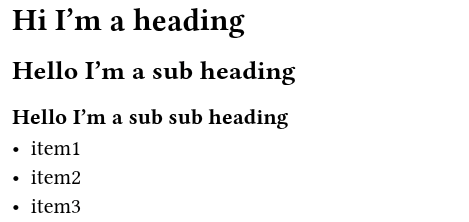
Heading and Bullets example
If you’re on the same typesetting pages as me, pun intended, I think you’ll resonate with said example.
The second reason was the build system. Debugging LaTeX documents was never fun and the output is verbose enough you had to dig in. Typst logs are literal and the build system is fast and straightforward.
# Build a document
typst compile <file>

Error example
convert from LaTeX to Typst#
Well the old resume has 10years of cruft, abstraction, and weird fixes. I could start manually moving stuff meh
Pandoc makes makes this an easy conversation. To include a container for a one-off run.
docker run --rm --volume "$(pwd):/data" --user $(id -u):$(id -g) pandoc/typst resume.tex -o resume.typ
The output is rather basic, and everything is shoved into a few #block containers, but the order and contents remained.
formatting, space, and alignment#
The real magic of typesetting comes to fruition in formatting.
Raise you hand of you’ve spent too much time trying to set tab stops to align items, varying text and font, image alignment… And once you achieved perfection, how did an edit years later pan out?
Typst makes this dead simple.
font#
Well this is document, let’s talk text. Usually you just start typing. We can set our default typesetting with set text(). If we want to vary the text setting along the way we call #text
#set text(
  font: "Liberation Sans",
  size: 10pt,
  fill: rgb("#111111"),  // Default text color
)

I'm the default 10pt Banana

// Set text for a single line
#text(12pt)[Banana for scale]

Font example
relative size#
Typst has a few tools for how big or small to make something. The best starting point is font size. Instead of changing font sizes all over we can use the power of relative sizes.
- em - 1 “font size”
- fr - 1 “fraction of available space”
em:
I'm the default 10pt Banana

// this is effectively 20pt (2x10pt)
#text(2em)[I'm a big banana]
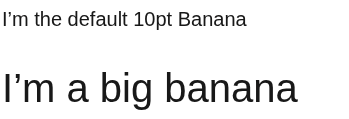
EM example
fr:
Is really useful for making tables, columns, etc.
The following example is 1 line with 3 columns.
2fr will take up twice the space and auto will fit the content provided.
// A text grid with varying size

#grid(
  columns: (1fr, 2fr, auto),
  gutter: 2em,
  [*1 Banana*],
  [2 _Banana_],
  [auto Banana]
)

FR example
https://typst.app/docs/reference/layout/grid/
https://typst.app/docs/reference/layout/fraction/
https://typst.app/docs/reference/model/table
images and box#
Aforementioned, typesetting excel at formatting and image alignment is a huge pain point for document creation.
Typst provides #block and #box containers for making sure stuff sticks together. These are super useful when you want to pair text and images.
I found block useful for adding icons to my resume contact entries.
== Block
// Block ties text together
#block(
  "Pretend this is a super long paragraph of text that will wrap across multiple lines and demonstrate how blocks work in Typst.",
)

== Box
// Like block, box ties things together inline
#box(
  baseline: 0.25em,
  image("assets/phone.svg", width: 1em, height: 1em, scaling: auto),
)

Container example
https://typst.app/docs/reference/layout/block/
https://typst.app/docs/reference/layout/box/
modules#
In the true form of engineering let’s abstract what we can for reuse. Modules are useful for authoring documents with differing content while maintaining formatting, or least of all minimize repetition across our document.
https://typst.app/docs/reference/foundations/module/
You can create a module template to import as easy as making a new .typ file. Once created, you can reference it by using import. I found this useful for iterating job entries, companies, and resume sections.
Following the concept of job-entries, let’s define template.typ with variable name and function job-entry:
#let name: kd8bny   // just a variable. Not really useful in this small example.

#let job-entry(
  title: "",
  division: "",
  location: "",
  date: "",
) = {
  block(width: 100%, breakable: false)[
    #grid(
      columns: (1fr, auto),
      [ *#title* \ #text(fill: secondary-color)[#division] ],
      [ #text(fill: secondary-color, size: 9pt)[#date] \ #text(size: 9pt, style: "italic")[#location]],
    )
  ]
}
We can import it into our document as such:
#import "template.typ": *

#job-entry(
  title: "Delivery Boy",
  division: "Express Planetary Delivery",
  location: "Earth",
  date: "3015-3019")

Module example
“Import All The Things” is hardly ever a best practice. This import statement brings everything declared in the module into the current scope of the document. I think this is good practice for some functions that you might consider to be more global or holistic to the document. But what do I know.
A generally better approach would be importing specific components of the module e.g. :
#import "template.typ"

#template.job-entry(/*args*/)
#template.name
headers and footers#
The header and footer definitions are a part of the page function, of which defines the bounds of a document.
https://typst.app/docs/reference/layout/page/
#set page(
  paper: "us-letter",
  margin: 1.5cm,
  header: "header stuff"
  footer: "footer stuff"
)
In my opinion this is a tad clunky if you want to have an aligned and descript footer like I did, it might be ideal to set a footer variable and reference it later.
#let footer = context [
  #set text(size: 9pt)
  #grid(
    columns: (1fr,) * 3,
    gutter: 0.5em,
    [
      #let date = datetime.today()
      #date.display()
    ],
    [
      #align(center)[kd8bny]
    ],

    [
      #align(right)[#counter(page).display()]
    ],
  )
]

#set page(
  paper: "us-letter",
  margin: 1.5cm,
  footer: footer,
)

Footer example
tl;dr#
There is a bunch of stuff I didn’t cover here. There is a bunch of stuff I still don’t know.
Overall, I found Typst to be pleasant to work with, and I don’t regret moving my formatting over from tried and true LaTeX at this moment. The improved build architecture, syntax, and flexibility I anticipate paying dividends on my next set of updates within the next decade.